T738U_LOADER_BIT-A.tgz FEATURED [ 2026-07-22 20:22:54 ]
T738U_LOADER_BIT-C FEATURED [ 2026-07-22 20:22:25 ]
T738W_LOADER_BIT-C.rar FEATURED [ 2026-07-22 20:21:44 ]
T820_LOADER_BIT-3.tgz FEATURED [ 2026-07-22 20:21:13 ]
T978U_LOADER_BIT-9.rar FEATURED [ 2026-07-22 20:20:48 ]
T978W_LOADER_BIT-9.rar FEATURED [ 2026-07-22 20:20:17 ]
W9023_LOADER_BIT-8.rar FEATURED [ 2026-07-22 20:19:35 ]
X210_LOADER_BIT-9.rar FEATURED [ 2026-07-22 20:18:44 ]
X210_LOADER_BIT6.tgz FEATURED [ 2026-07-22 20:18:10 ]
0%

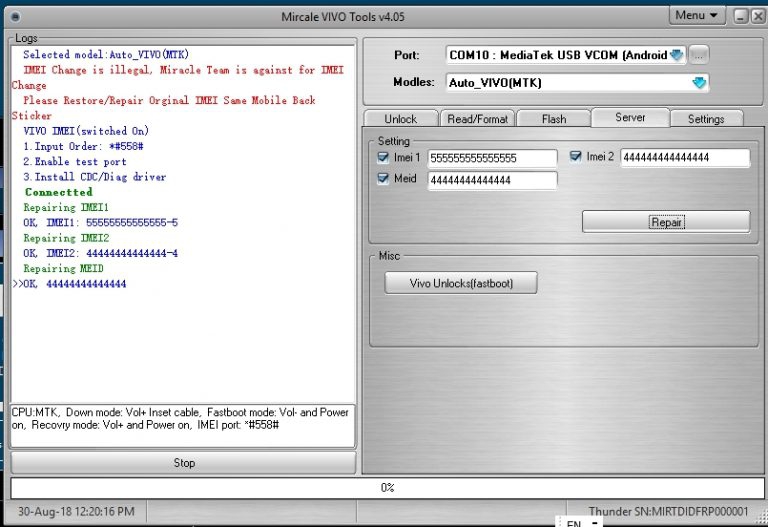
VIVO Y83 & Y83A IMEI Using Miracle Vivo Tool

FREE DOWNLOAD

Date 2020-09-19 10:27:07
Filesize 1.00 MB
Visits 2157
Downloads 569
Download

Repair VIVO Y83 & Y83A IMEI Using Miracle Vivo Tool

Probably you may face null IMEI issue or invalid IMEI issue on VIVO Y83 & Y83A devices after flashing firmware. Generally, it’s a main issue of no SIM network in mobile. You can’t make a call using your device, if you have a null IMEI or invalid IMEI error.

Pre-Requirements To Flash VIVO Y83 & Y83A IMEI With Miracle Vivo Tool:

  • Make sure you have already null IMEI or invalid IMEI problem on the device. Dial *#06# code and check IMEI status of the device. [If it’s showing null IMEI or Invalid IMEI, continue the process]
  • This method is only and only for MTK [MediaTek] android devices [Smartphone/Tablets]
  • Note down original IMEI number of the device to write it again on the device.
  • Miracle tool box. [Download from Here
  • Working USB cable.
  • Laptop or pc/computer to write new IMEI on MTK mobile.

How To Repair VIVO Y83 & Y83A IMEI:

Type *#558# on Dial Pad
Then Click on Quality Verification Test
Then Click on Development Debug
Last Click on Debugging Port

Review This!

Only users can review this file after download